


Security
This document describes the security settings related to members’ access permissions in Xint.
These settings can be found in the “Settings > Security” tab within the app, and only Admin users can configure them.
Login Methods
Section titled “Login Methods”You can restrict the methods members use to log in to the organization. Admin users are not affected by this setting and can use all login methods.
This method uses a one-time magic link or verification code sent via email to log in.
Google Login
Section titled “Google Login”This method uses a linked Google account to log in. You can link your Xint account with a Google account when signing up for Xint via an invitation or from the personal account settings page.
OIDC Single Sign-On
Section titled “OIDC Single Sign-On”This method uses OpenID Connect-based Single Sign-On to log in.
For more details, please refer to the Single Sign-On document.
IP Restriction
Section titled “IP Restriction”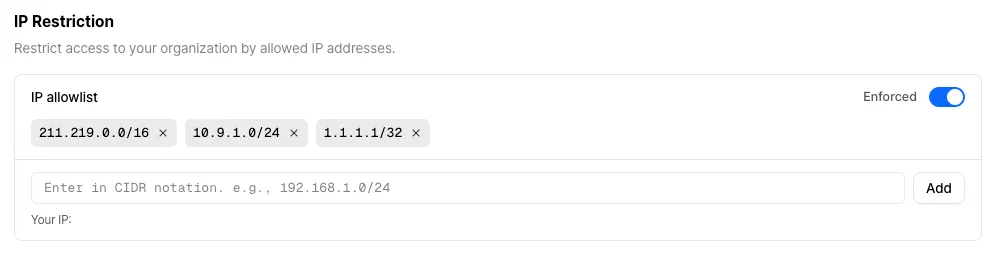
This option enhances security by restricting organization access to only allowed IP addresses. You can manage whether the IP restriction feature is enabled and the IP allowlist.
The configured IP allowlist is applied only when the IP restriction feature is enabled. Please note that if the feature is enabled while your current IP address is not on the allowlist, your access will be restricted immediately.